@canva/app-scripts migration guide
If your app has its own webpack.config.ts and a bespoke scripts/start/ dev-server runner, this guide walks you through replacing that setup with @canva/app-scripts(opens in a new tab or window), the package that now powers the canva apps start and canva apps build Canva CLI commands.
It applies to any app with the previously standard webpack.config.ts and a bespoke scripts/start/ dev-server runner, whatever created it originally, including apps created from an older snapshot of the starter kit for apps inside Canva or one of the CLI templates.
Why migrate
@canva/app-scripts is the best way to build your Canva App. It replaces multiple dependencies, config files, and build scripts with a single package that provides everything you need to build and run your app. Performance is greatly enhanced and maintenance is simplified.
The main benefit is the bundler: @canva/app-scripts defaults to Rsbuild(opens in a new tab or window) instead of webpack, which means faster builds and faster Hot Module Replacement (HMR), with no configuration required.
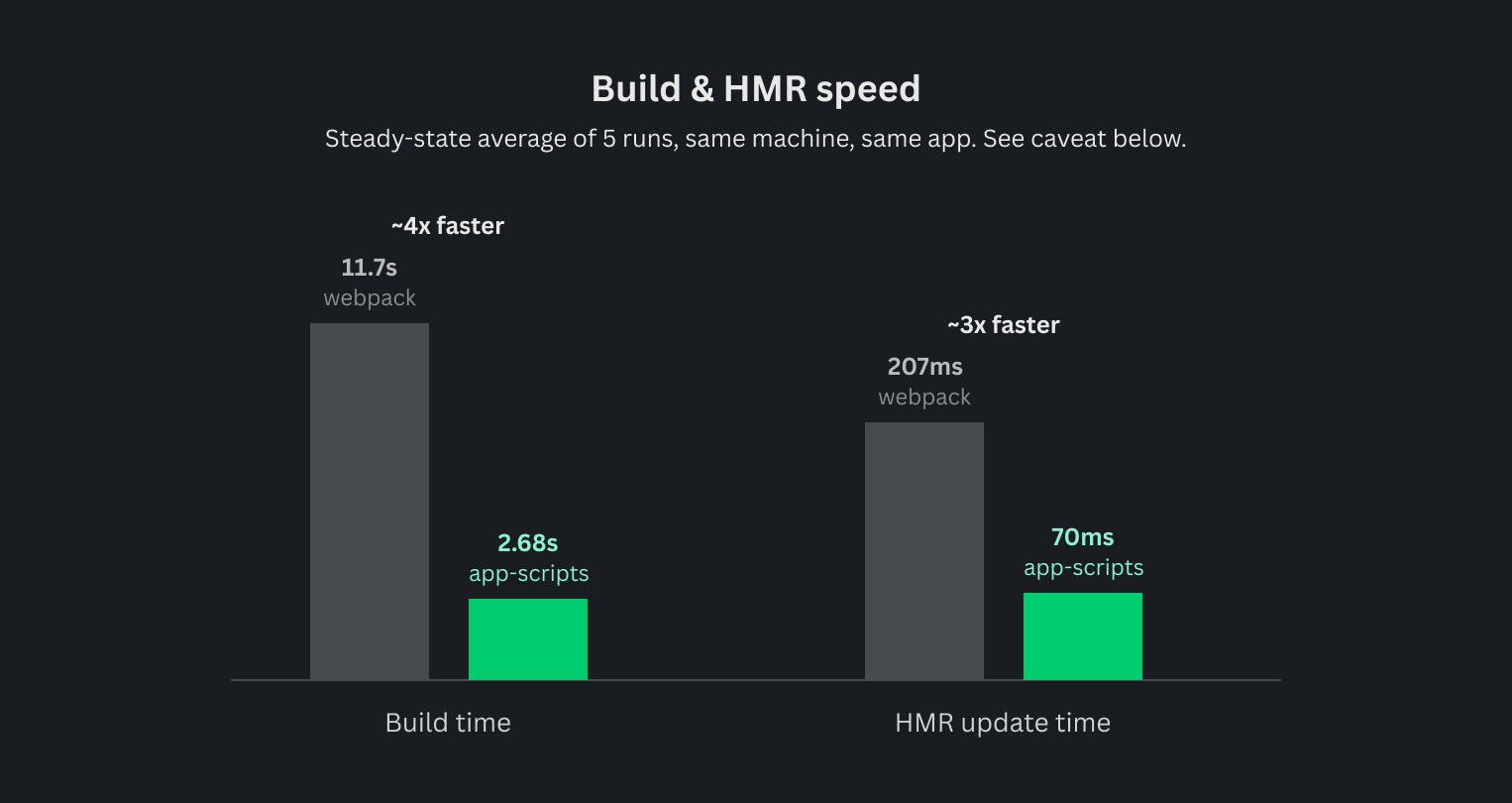
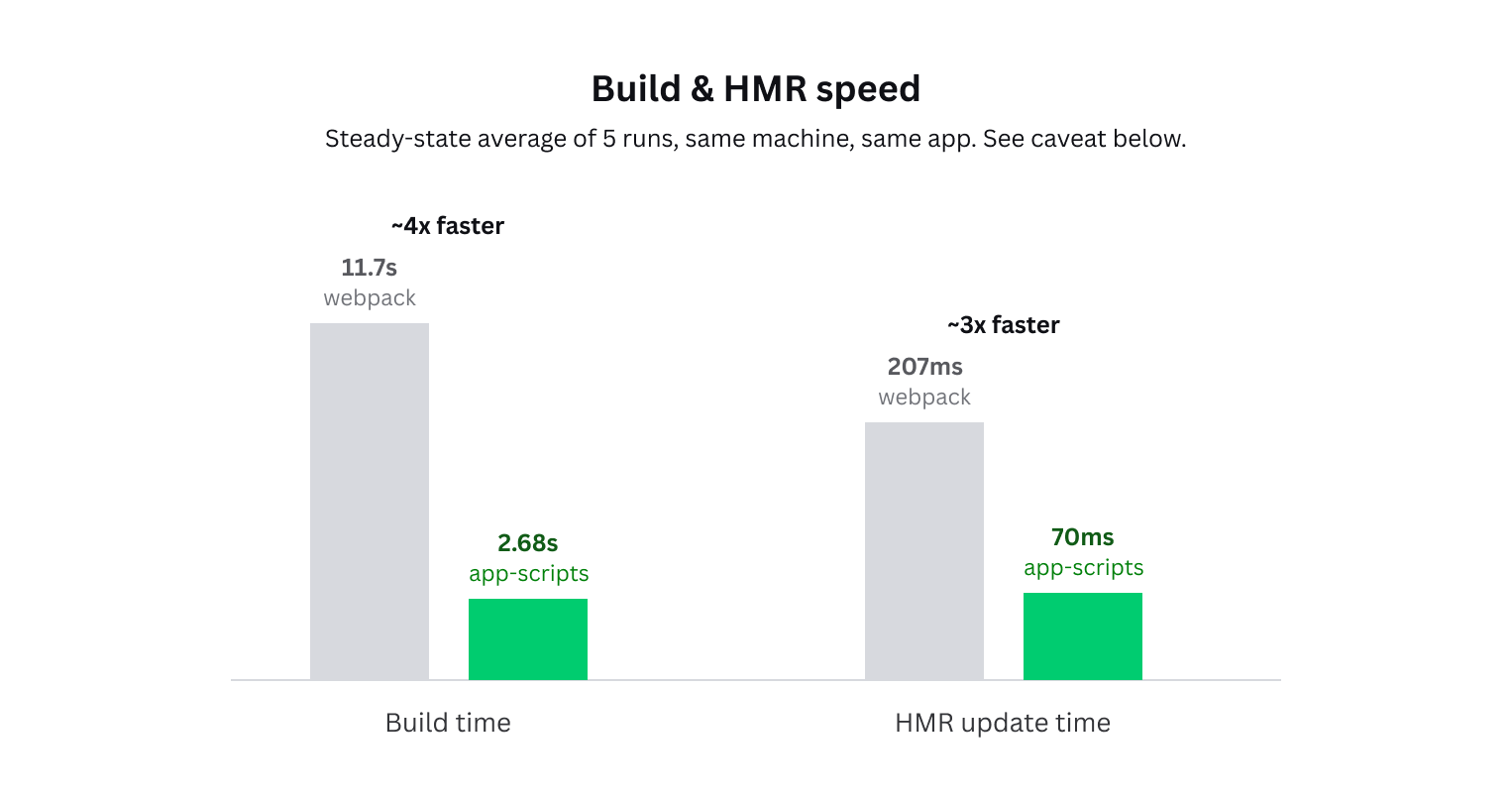
Measured on the hello_world app in the starter kit for apps inside Canva. Your own numbers will vary by project size and machine, but the general improvement should be consistent.
The other half of the move is maintenance. Your app's webpack.config.ts and scripts/start/ runner carry a lot of scaffolding just to run and build: backend orchestration, SSL certificates, tunneling, and a long tail of loader and plugin devDependencies to keep in sync yourself. @canva/app-scripts moves all of that into the package itself, hidden away in node_modules.
Here's what that move looks like in your project's file tree - the migration deletes most of what you used to maintain by hand, while everything else about your app, including the rest of src/, is untouched:
Before:
my-app/├── .env├── canva-app.json├── package.json├── tsconfig.json├── webpack.config.ts├── scripts/│ ├── start/│ │ ├── app_runner.ts│ │ ├── context.ts│ │ ├── start.ts│ │ └── __tests__/│ └── ssl/│ └── ssl.ts└── src/├── app.tsx├── index.tsx└── styles.css
After:
my-app/├── .env├── canva-app.json├── package.json├── tsconfig.json└── src/├── app.tsx├── index.tsx└── styles.css
Automated migration tool
If your app matches the unmodified starter kit shape described below, the Canva CLI can handle the migration for you:
-
If you haven't already, install the Canva CLI:
npm install -g @canva/cli@latestSHELL -
In your app directory, run the migration command:
canva apps migrate webpack-to-app-scriptsSHELL
This migration only handles that exact shape. If your app has a custom webpack.config.ts, or a non-standard scripts/ directory, it's recommended to follow the manual steps below instead.
Manually migrate to @canva/app-scripts
1. Install the CLI and app-scripts
-
If you haven't already, install the Canva CLI globally:
npm install -g @canva/cli@latestSHELL -
Add
@canva/app-scriptsas adevDependencyof your app:npm install --save-dev @canva/app-scriptsSHELL
2. Delete the old build tooling
Delete the following files. Nothing in @canva/app-scripts reads them, and keeping them around only invites drift between the old and new setups:
webpack.config.tsscripts/start/(includingapp_runner.ts,context.ts,start.ts, and any tests underscripts/start/__tests__/)scripts/ssl/(includingssl.ts). SSL certificate generation is now handled internally by@canva/app-scripts, driven by the--use-httpsflag.
rm webpack.config.tsrm -rf scripts/start scripts/ssl
If your app has custom loaders, plugins, or other webpack configuration files beyond webpack.config.ts itself, delete those too, after you've confirmed their behavior is covered by the bundler section below.
3. Audit and clean up dependencies
Once the files above are removed, several devDependencies are no longer necessary. Only remove a dependency once you've confirmed nothing else in your app still imports it.
Safe to remove, if only used by the deleted files:
- Bundler and loader toolchain:
webpack,webpack-dev-server,webpack-cli,ts-loader,css-loader,css-modules-typescript-loader,cssnano,style-loader,postcss-loader,mini-css-extract-plugin,url-loader,terser-webpack-plugin,@svgr/webpack,@pmmmwh/react-refresh-webpack-plugin,react-refresh - Old i18n extraction CLI:
@formatjs/cli(superseded bycanva apps build's automatic extraction) - Dev-server and backend orchestration:
nodemon,@types/nodemon,@ngrok/ngrok,tree-kill,esbuild-register - SSL:
node-forge,@types/node-forge - CLI or preview output:
cli-table3,chalk,open - Environment loading:
dotenv.@canva/app-scriptsloads.envfiles internally, so the explicit dependency is usually no longer needed. @canva/cli. It's designed to be installed globally, not as a per-appdevDependency. The only reason it was listed here wasscripts/start/app_runner.ts's call togeneratePreviewUrl, which is gone along with that file. Going forward, you'll run your app through the global install.
npm uninstall webpack webpack-dev-server webpack-cli ts-loader css-loader css-modules-typescript-loader cssnano style-loader postcss-loader mini-css-extract-plugin url-loader terser-webpack-plugin @svgr/webpack @pmmmwh/react-refresh-webpack-plugin react-refresh @formatjs/cli nodemon @types/nodemon @ngrok/ngrok tree-kill esbuild-register node-forge @types/node-forge cli-table3 chalk open dotenv @canva/cli
Not every one of these will be present in your app - the exact set has shifted over time as the starter kit evolved. npm uninstall handles a mixed list fine: it removes whatever's actually a dependency and silently skips anything that isn't, so it's safe to run the full command regardless of when your app was scaffolded.
Don't remove, even though they look webpack-only:
@types/webpack-env. It provides the ambient type formodule.hot, and Rsbuild and webpack both implement this webpack-compatible API. If your entry file has aif (module.hot) { module.hot.accept(...) }block for hot module reloading, removing this type package silently breakstscwith no useful error message.@formatjs/ts-transformer, if yourjest.config.*'stransformblock wires it in as a ts-jest AST transformer. This is independent of your build path and is used for message ID extraction at test-compile time. Removing it doesn't produce a visible error. Instead, Jest silently discovers zero tests everywhere, which is easy to mistake for "all green" instead of "broken." After touching this dependency, always add a throwaway sanity test (test("x", () => expect(1).toBe(1))) and confirm the test runner still finds it.
4. Run your app
With @canva/app-scripts installed, run your app directly through the globally installed Canva CLI:
canva apps startcanva apps start --previewcanva apps build
This is the intended way to run your app. If you'd like to keep start, start:preview, and build scripts in package.json too (for consistency with other projects, or because CI expects an npm run build), they need to invoke the CLI through npx so they work standalone:
Before:
{"scripts": {"start": "tsx ./scripts/start/start.ts","start:preview": "npm run start -- --preview","build": "webpack --config webpack.config.ts --mode production && npm run extract","extract": "formatjs extract \"src/**/*.{ts,tsx}\" --out-file dist/messages_en.json"}}
After:
{"scripts": {"start": "npx @canva/cli apps start","start:preview": "npx @canva/cli apps start --preview","build": "npx @canva/cli apps build"}}
Drop the extract script entirely rather than aliasing it to something broken. canva apps build now runs translation extraction automatically as part of the build, and there's no working standalone verb to call instead.
5. Add a config file, only if you need one
canva-app.config.ts is optional. Most apps need no config file at all: @canva/app-scripts defaults to a TypeScript entry at src/index.tsx, output to dist, Rsbuild as the bundler, and FormatJS i18n already configured.
Create canva-app.config.ts at your project root only if one of the following applies:
-
Your app's frontend entry isn't the default. Set
entryto the correct path.// canva-app.config.tsimport { defineConfig } from "@canva/app-scripts";export default defineConfig({entry: "./src/main.tsx",});TS -
Your app has a backend. Set
backend.entryto point at your backend's entry file:// canva-app.config.tsimport { defineConfig } from "@canva/app-scripts";export default defineConfig({backend: {entry: "./backend/server.ts",},});TS -
You need to customize the build, or keep using webpack. See Customizing the build, or keeping webpack below.
If none of these apply, skip creating the file.
6. Update tsconfig.json
- Add
"./*.ts"toinclude, so a root-levelcanva-app.config.tsgets type-checked and linted. - Remove the
"webpack.config": ["./webpack.config"]entry fromcompilerOptions.paths. It's a dead reference oncewebpack.config.tsis gone. - Leave
"webpack-env"incompilerOptions.typesalone. See the dependency audit above.
Customizing the build, or keeping webpack
Migrating to @canva/app-scripts migrates your app to the Rsbuild bundler by default. It ships with @rsbuild/plugin-react(opens in a new tab or window), @rsbuild/plugin-svgr(opens in a new tab or window), and @formatjs/unplugin(opens in a new tab or window) already wired in, along with equivalent CSS module, SVG, and static asset handling. Most apps need no plugin installation at all.
If you need to go beyond the defaults, or you'd rather keep webpack, the config field in defineConfig is your escape hatch:
Customize Rsbuild (the default), without switching bundlers:
// canva-app.config.tsimport { defineConfig } from "@canva/app-scripts";export default defineConfig({config: {// Rsbuild config shape, merged with the adapter's own defaults.},});
Keep using webpack instead:
// canva-app.config.tsimport { defineConfig } from "@canva/app-scripts";export default defineConfig({bundler: "webpack",config: (config, { mode }) => {if (mode === "production") {// webpack Configuration shape, merged with the adapter's own defaults.return config}return config;}});
FormatJS i18n and the message ID pattern constraint
The one behavior that needs deliberate attention when moving from a legacy webpack setup is FormatJS i18n message extraction. Rspack (the bundler behind Rsbuild) transpiles TypeScript with SWC, which doesn't support custom TypeScript AST transformers. That means @formatjs/ts-transformer, the transformer a legacy webpack config typically wires through ts-loader, has no Rspack equivalent. The Rsbuild adapter uses @formatjs/unplugin instead.
This matters because @canva/app-scripts always generates message IDs using a fixed pattern ([sha512:contenthash:base64:6]), the same pattern on both the Rsbuild and webpack adapters. This isn't currently exposed as a canva-app.config.ts option. If your old transformer configuration used a different pattern, generated message IDs will drift after migrating, and your existing translation catalogs will stop matching at runtime. This failure is silent until it reaches production, so re-extract and re-check your translation catalog as part of the migration rather than assuming it still lines up.
Verify the migration
After completing the migration, confirm the following before considering it done:
- Type-check:
tscshould be clean. A stray reference to a deleted file or type is the most common failure here. - Lint:
eslintshould be clean. - Tests: run your test suite and confirm it actually discovers tests, not just that it reports zero failures. Silently discovering zero tests looks identical to "all green" unless you check the test count directly. See the
@formatjs/ts-transformernote above. - Format:
prettier --checkshould be clean. - Start the app: run
canva apps startand confirm the dev server boots and serves your app in a browser. - Backend apps: confirm the backend also starts and is reachable, and that Ctrl+C cleanly tears down both the frontend and the backend. Specifically check that the backend's port is freed afterward, not just that the frontend process exits.
- Build: run
canva apps buildand confirm it produces both your app bundle and the extracted translation catalog (messages_en.json) from a single command.
Related
- Canva App Scripts: what
@canva/app-scriptsdoes, and how to customize it away from its defaults. - Test harness: if your app uses the test harness, its setup instructions have also been updated for
@canva/app-scripts.